
We care about your privacy
By using cookies and related technologies (e.g. pixels, SDK), as well as by processing your personal data (including unique identifiers, browser data), we can better adapt the displayed content to your needs.By giving your consent to the storage of information on your terminal equipment, and to the access and processing of data, including in the sphere of profiling as well as market and statistical analysis, you will easily find exactly what you are searching for and what you need on Allegro. The controller of your personal data will be Allegro or, in certain cases, our partners (17 partners), including "IAB Europe Trusted Partners" (9 partners). Information about the purposes of personal data processing by our partners can be found in their privacy policies.
We and our partners may process personal data for the following purposes:
Store and/or access information on a device. Personalised advertising and content, advertising and content measurement, audience research and services development. Ensure security, prevent and detect fraud, and fix errors. Deliver and present advertising and content. Save and communicate privacy choices. Match and combine data from other data sources. Link different devices. Identify devices based on information transmitted automatically.
Your personal data are also processed to make it easier for you to use our web pagesThe purposes of processing are described in detail in the settings under "CHANGE MY CONSENTS" and in the Cookie Policy.Your consent is voluntary and is valid for 12 months. You may withdraw it at any time or renew it in the Cookie settings on the home page. Withdrawal of your consent does not affect the lawfulness of processing performed before the withdrawal.
Flexible bundles — check what opportunities they offer
A flexible bundle is a single bundle instead of several ones that comes with a simple percentage discount. Learn more about it and start using it now!
Starting June 10, 2026, we will simplify the tool for creating new bundles on Allegro. We are replacing the current fixed offer bundles with flexible bundles.
What it means for you
- No more bundle replication: instead of creating separate bundles for each color or size (for example, iPhone + red phone case, iPhone + black phone case), you will now create one bundle. Buyers will select the variant (color, size) that you prepared and that they like themselves. They can also buy the bundle without the given item. That way, the customers select purchasing from you instead of searching for competitors' offers — and you have a greater chance of a sale.
- Safe discounts without any risk of a mistake: until now, it was easy to make a mistake when offering an order discount — for example, enter the discounted price instead of the discount amount. It is easier with the flexible bundles! You only enter the percentage (for example, 10% cheaper when purchasing a bundle), and we automatically convert the prices of your products. All existing bundles where you added the order discount yourself remain unchanged. They will still operate and be displayed to the buyers as before.
- Time savings: we will convert the existing automatically created offer bundles into flexible bundles. You will find them in the new tab when using the automatic filter. Remember: those bundles do not have a discount added! We do not lower the price of your products for you — you decide when and what percentage discount you want to add.
- Margin flexibility: you decide whether you grant the discount for the entire bundle or only selected elements.Instant bulk editing: do you want to change the discounts of multiple bundles simultaneously? Now you can easily and quickly update the pricing strategy for your assortment.
How it worked until now
You could sell only one variant of the same product within an offer bundle. Your customers could only buy the entire bundle — they could not switch to another variant or product.
What we have changed
Within a flexible bundle, you can offer all product variants you sell. It means buyers will see a single bundle with variant selection, rather than several very similar bundles. When they buy a bundle:
- they have a full selection of variants to choose from — instead of searching for separate offers, they can easily select a variant that suits them best from your assortment
- they can buy only those offers from a bundle they are interested in.
Example
You create a flexible bundle that consists of 5 offers: iPhone 13 + red phone case + black phone case + blue phone case + charger. When purchasing, the customer decides whether they want to buy all offers within the bundle, or, for example, only the iPhone + the charger, or only the iPhone + the phone case in the selected color.
How to create a flexible bundle
- Go to the Offer bundles tab.
- Click [add new].
- Click [add offers] and decide which offers the bundle will consist of. One bundle can consist of maximum 6 elements — a group of offers from the same category.
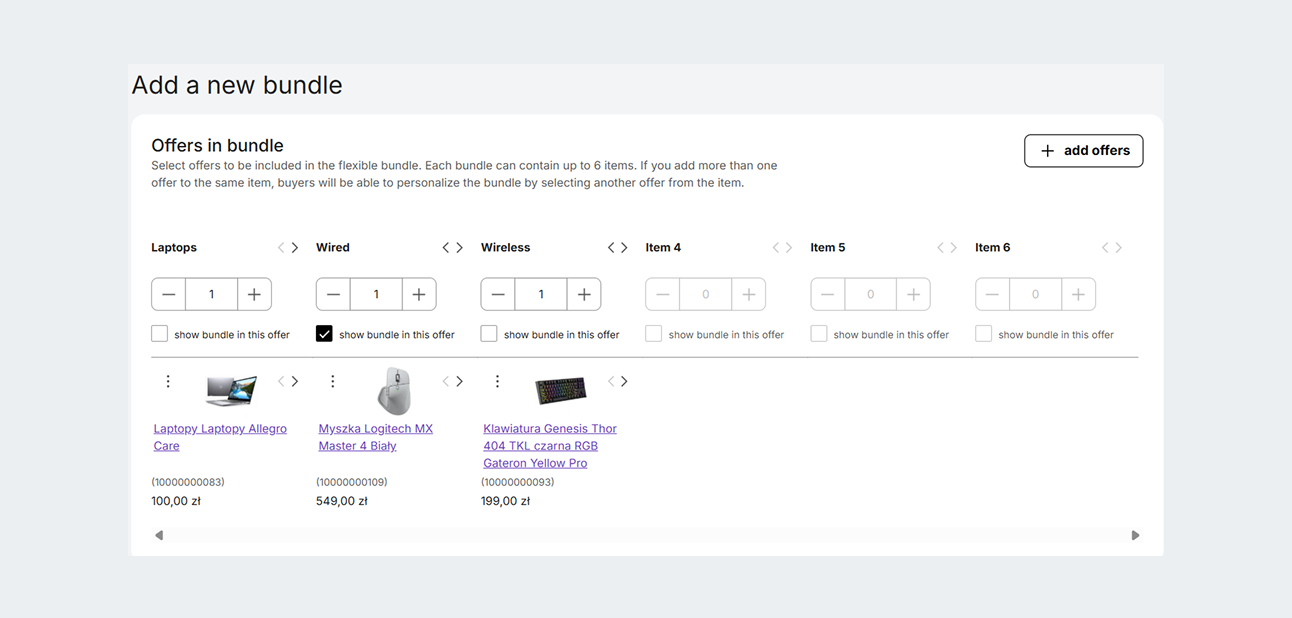
- Click [save]. If you want, you can add a discount to the bundle or selected offers.
- Decide on the offer page where you want to display the bundle — check or uncheck the show bundle in this offer option. For example, you want to display the following bundle only on the iPhone's page — iPhone + phone case + charger — because the customer might be willing to buy cheaper accessories along with it.Check the summary and, if everything is correct, click [save bundle]. Finished!
We group offers on other positions based on the shared category. If you add more than one offer to the selected position, the customer will be able to personalize the bundle and select another offer when making a purchase.
You can change the order using the arrows and move offers between the positions, to present your bundle in the best possible way.
Managing the discounts in a flexible bundle
You can offer your customers a discount on a purchase in your flexible bundle. You select the discount percentage yourself — separately for each marketplace.
You can offer your customer a discount:
- for the whole bundle — for example, 10%
- for the selected items in a bundle — for example, 10% for one offer, 20% for another offer, and no discount for the third offer.
To disable the discounts within an offer, click the three dots icon next to the offer and select the [exclude from the discount] option.
We will display discount information on the offer's page, below the price:
In the Offer bundles tab, we will still display the bundles with the discount you created. If you want, you can terminate them yourself and use them to create a new flexible bundle.If you create a flexible bundle using the same offer from an active offer bundle — we will automatically terminate the offer bundle.
Learn more about the flexible bundles from our article.
appearance: light theme
